• Implementing or migrating to Dynamics 365 Business Central SaaS is a major step for any organisation. Yet one of the most common challenges I see—across industries, sizes and maturity levels—is that teams underestimate the breadth of the platform. Business Central is not just a finance system; it is a complete operational backbone that touches every part of the business.

    Microsoft has built a comprehensive learning ecosystem that brings together documentation, structured learning paths, capability guides, release notes and practical examples. This ecosystem is the most reliable and up‑to‑date source of truth for organisations preparing for an implementation, planning a migration, or onboarding end users.

    Below is a structured overview of this “official library” and why it matters for project teams, decision‑makers and everyday users.

    1. Understanding the Full Scope of Business Central

    Before any workshops, configuration or data migration, organisations need clarity on what Business Central can actually do. The official documentation provides a complete view of the platform’s capabilities across:

    • Finance and accounting
    • Sales and customer management
    • Purchasing and vendor management
    • Inventory and warehouse operations
    • Manufacturing and production
    • Project accounting
    • Service management
    • Reporting, analytics and automation
    • Security, administration and environments

    This is not marketing material; it is detailed, practical and continuously updated by Microsoft.

    2. Role‑Based Learning Paths for Every Type of User

    One of the strengths of Microsoft Learn is that it recognises the different roles involved in an ERP project. Whether you are a functional consultant, a finance user, a warehouse supervisor or a system administrator, there is a dedicated learning path designed for your responsibilities.

    These modules are:

    • Practical
    • Scenario‑driven
    • Easy to follow
    • Continuously updated
    • Ideal for onboarding and adoption

    For organisations preparing for go‑live, these learning paths reduce training time and increase user confidence.

    3. Capability Guides for Scoping and Decision‑Making

    During early discovery and scoping, teams often struggle to understand what Business Central delivers out of the box versus what requires configuration or extension. Microsoft’s capability guides help bridge this gap.

    They provide:

    • Functional summaries
    • Process overviews
    • Feature explanations
    • Industry‑agnostic examples

    These guides are especially useful for fit‑gap analysis and for aligning expectations between business stakeholders and the project team.

    4. Staying Ahead with “What’s New” and Release Notes

    Because Business Central SaaS evolves monthly, staying informed is essential. Microsoft maintains a dedicated “What’s New” section that outlines:

    • New features
    • Improvements
    • Deprecations
    • Roadmap items
    • Release timelines

    This allows organisations to plan enhancements, anticipate changes and take advantage of new capabilities as soon as they are available.

    5. Visual and Media Resources for Practical Understanding

    For teams that prefer visual learning, Microsoft also provides:

    • Official demos
    • Feature walkthroughs
    • Scenario videos
    • Release overviews

    These resources help users understand processes in a more intuitive way and are excellent for internal training sessions.

    6. Official Microsoft Documentation and Learning Links

    Here are the official links, all from Microsoft:

    6.1 Official Business Central Documentation

    Complete functional documentation across all modules.

    👉 Microsoft Dynamics 365 Business Central documentation – Business Central | Microsoft Learn

    6.2 Microsoft Learn – Business Central Training Paths

    Role‑based learning for end users, consultants and administrators.

    👉 Training for Dynamics 365 Business Central | Microsoft Learn

    6.3 What’s New in Business Central

    Latest features, improvements and roadmap updates.

    👉 New and planned features for Dynamics 365 Business Central, 2025 release wave 2 | Microsoft Learn

    6.4 Business Central Product Page

    High‑level overview of capabilities and value.

    👉 Agentic CRM and ERP Solutions | Microsoft Dynamics 365

    6.5 Official Dynamics 365 Videos

    Walkthroughs, demos and feature explanations.

    👉 Microsoft Dynamics 365 Business Central – YouTube

    6.6 Official Business Central playlist on the Microsoft Dynamics 365 channel

    This is an official playlist within the general Microsoft Dynamics 365 channel, focused on Business Central: overview, cloud migration, integrations, improvements, etc.

    👉 Business Central – YouTube

    7. Why This Matters for Organisations and End Users

    A successful ERP project is not defined by configuration alone. It is defined by:

    • How well users understand the system
    • How clearly the organisation aligns processes with capabilities
    • How effectively decisions are made
    • How quickly teams adapt to change
    • How confidently the business adopts new features

    Microsoft’s official learning ecosystem gives organisations the structure, clarity and depth they need to achieve this.

    To Conclude:

    Mastering Business Central is not about memorising screens or menus. It is about understanding the platform’s capabilities, aligning them with business goals and empowering users with the right knowledge. Microsoft’s official library provides everything organisations need to build confidence, accelerate adoption and unlock the full value of Business Central SaaS.


  • Implementing an ERP system such as Dynamics 365 Business Central SaaS has evolved far beyond the traditional view of project management. Today, organisations expect their ERP initiatives to deliver measurable value, strengthen operational resilience, and support long‑term strategic goals. Achieving this requires more than a well‑structured plan; it demands a leadership approach that blends governance, foresight, and a deep understanding of how Business Central behaves in real‑world environments.

    1. Strategy Before Execution

    One of the most common pitfalls in ERP projects is starting too quickly. Teams rush into workshops, configuration and data migration without establishing a strategic foundation. Modern project leadership takes the opposite route: it begins with clarity.

    This includes:

    • defining the business outcomes the ERP must enable
    • identifying constraints early (capacity, data quality, regulatory requirements)
    • aligning the project with the organisation’s operating model
    • establishing decision‑making criteria before decisions are needed

    In Business Central SaaS, this strategic clarity is essential because the platform evolves continuously. A decision made today may look different in six months due to new features or licensing changes. Strategic leadership anticipates this and builds flexibility into the roadmap.

    2. Governance That Actually Works

    Governance is often misunderstood as bureaucracy. In reality, good governance is what keeps ERP projects predictable and aligned with value.

    A modern governance model for Business Central typically includes:

    • a steering committee focused on outcomes, not technical detail
    • decision logs that prevent circular discussions
    • clear escalation paths
    • structured checkpoints aligned with Microsoft’s Success by Design framework

    The goal is not to slow the project down but to ensure that decisions are made once, made well, and made with the right information.

    3. Evidence‑Based Decision Making

    ERP projects are full of uncertainty: data quality, process maturity, user readiness, integration complexity. Instead of relying on assumptions, strategic project leadership uses evidence.

    Examples include:

    • validating data quality before committing to migration timelines
    • running early prototypes to test process fit
    • using telemetry and usage analytics during pilots
    • comparing scenarios for licensing, environments and support models

    Business Central SaaS provides a rich ecosystem of tools—telemetry, Power BI, sandbox environments—that allow teams to test, measure and adjust before decisions become costly.

    4. Managing Risks as Strategic Inputs

    Risk management is not a register; it is a continuous strategic activity. In Business Central projects, risks often emerge from areas such as:

    • dependency on external systems
    • data migration complexity
    • limited internal capacity for testing
    • process redesign that requires behavioural change
    • regulatory or localisation requirements

    Modern project leadership treats these risks as inputs for planning, not as administrative tasks. Instead of simply documenting them, teams model their impact, explore scenarios and adjust scope, timelines or resources accordingly.

    5. People and Adoption at the Centre

    No ERP succeeds because of configuration alone. The real transformation happens when people adopt new ways of working.

    Strategic project leadership places adoption at the centre by:

    • involving key users early
    • designing training around real scenarios, not generic manuals
    • preparing managers to reinforce new behaviours
    • using Business Central’s simplicity to encourage ownership rather than dependency

    A technically perfect implementation without adoption is simply an expensive database.

    6. A Roadmap That Extends Beyond Go‑Live

    Go‑live is not the finish line; it is the first milestone of real value creation. Business Central SaaS encourages continuous improvement, and strategic leadership embraces this by planning:

    • post‑go‑live stabilisation
    • incremental enhancements
    • automation opportunities
    • integration maturity
    • periodic reviews aligned with Microsoft’s release cycles

    This long‑term view ensures that the ERP remains aligned with the organisation’s evolving needs.

    To Conclude:

    Strategic project leadership in Business Central SaaS is not about managing tasks; it is about shaping decisions, guiding people and ensuring that technology serves the organisation’s long‑term goals. When governance is clear, decisions are evidence‑based and risks are treated as strategic signals, ERP projects stop being unpredictable journeys and become structured, value‑driven transformations.

  • In many ERP projects, risk management is reduced to a formal register: a list of probabilities, impacts, and owners. While useful, this approach often remains on paper and fails to influence the project’s most critical decisions. Risks are documented, but not actively managed.

    Modern risk management goes further. It transforms uncertainty into a driver of strategic decisions.

    The Problem with the Traditional Approach

    • Risks are logged in matrices or heat maps.
    • They are reviewed in committees but rarely integrated into the timeline or budget.
    • Key decisions (scope, architecture, go‑live dates) are often taken before uncertainty is properly analysed.

    Risk management becomes a compliance exercise rather than genuine project support.

    The Modern Approach: Risks as Competitive Advantage

    1. Scenario Simulation Before Decisions
      • Example: before fixing the go‑live date, simulate what happens if data migration takes 50% longer.
      • Buffers and resources can then be allocated with precision, not generically.
    2. Smart Buffers Linked to Decisions
      • Buffers are not added “just in case” but justified by specific scenarios.
      • Example: “If user acceptance testing reveals gaps, we need a 3‑day buffer to address them.”
    3. Transparent Financial Conversation
      • The CFO or the Project Manager receives scenarios, not surprises: “Across three simulations, this buffer protects the testing phase and avoids a €20,000 productivity loss.”
    4. Risks as Strategic Compass
      • Rather than blocking decisions, risks guide the project towards stronger options.
      • Uncertainty becomes an input for planning, not an obstacle.

    Practical Examples in Business Central

    • Data Migration with Budget Scenarios: simulate a 50% delay and calculate the cost of extra consultancy and licences.
    • User Testing with Dimensions: assign buffer costs directly to the responsible department, avoiding dilution in the overall budget.
    • Manufacturing Projects: add a 5‑day buffer in production route setup; Business Central shows the cost impact versus potential plant downtime.
    • Sales Growth Simulation: apply a 10% factor to income lines post go‑live to test whether support buffers are sufficient.
    • Power BI Integration: visualise three timelines (optimistic, probable, adverse) with buffer costs, making risk impact clear to finance leadership.

    To conclude:

    In Business Central, risk management must evolve beyond registers and compliance. Modern practices such as scenario simulation, cost dimension analysis, transparent financial conversations, and real‑time lessons learned transform risks from static entries into dynamic inputs for decision‑making. By integrating uncertainty into project design from the outset, organisations turn risk into a strategic compass that guides stronger choices, safeguards budgets, and drives ERP success.

  • Buffers and Their Cost Impact

    Every buffer added to a project — whether extra days in testing or weeks before go‑live — translates into additional costs: consultant hours, extended licences, or supplier fees. The challenge is not the buffer itself, but failing to measure its financial impact.

    • Phase buffers: e.g., «Y» extra days in user testing → 24 consulting hours → «€ X,XXX».
    • Global buffer before go‑live: e.g., «Y» weeks → tens of thousands in external services.

    Smart risk management means treating buffers as controlled investments, not hidden overspend.

    Minimising Buffer Costs

    1. Proportional buffers – Add cushions only in critical phases (analysis, testing, migration).
    2. Documented investment – Record the cost of each buffer to justify its preventive value.
    3. Dynamic adjustment – Reduce or reallocate buffers if earlier phases close without issues.
    4. Scenario modelling – Use Business Central budget scenarios to compare costs with and without buffers.

    Risk Management Practices

    • Formal risk register with financial impact.
    • Scenario simulation with Power BI to visualise budget variations.
    • Supplier contract management to absorb buffers without extra billing.
    • Transparent communication with finance leadership to present buffers as mitigation, not overspend.

    To conclude:

    Buffers are necessary, but they must be managed with financial vision. In ERP projects, every extra day has a cost. By minimising their impact through proportional planning, scenario simulation, and transparent reporting, buffers evolve from hidden expenses into strategic investments that safeguard project success.

  • Dimensions in Budgets

    One of Business Central’s major differentiators is the ability to work with multiple dimensions in budgets.

    • Each budget can include dimensions such as department, project, customer, product, or region.
    • This allows analysis not only of overall results but also of the impact by business area.
    • Financial leadership thus gains a granular view that facilitates resource allocation and cost control.

    Budget Scenarios

    Business Central enables the creation of parallel budget scenarios:

    • Base scenario: the official approved budget.
    • Alternative scenario: simulations with different assumptions (e.g., 10% sales growth or 5% cost reduction).
    • Contingency scenario: projections for adverse situations, such as revenue decline or increased expenses.

    This functionality is essential for financial risk management, as it allows comparison of scenarios and anticipates decisions.

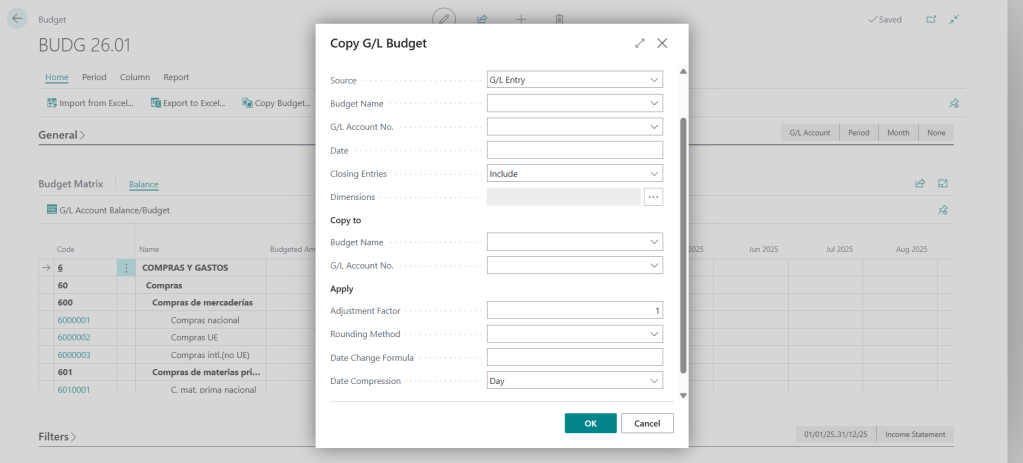
    Copying Budgets

    To optimise efficiency, Business Central offers the option to copy existing budgets:

    • A budget can be duplicated and only the necessary variables modified.
    • This saves time and ensures consistency in structure.
    • Ideal for preparing annual budgets based on the previous year’s history.

    Using the Factor in Budgets

    The factor option allows automatic adjustments:

    • Multiply or divide values by a percentage or coefficient.
    • Example: increase all income lines by 8% to simulate growth.
    • Reduce costs by 3% to project operational efficiency.

    This feature makes the budget a dynamic tool, capable of adapting quickly to new assumptions.

    Best Practice in Financial Leadership

    For budgets to be truly effective:

    • Define relevant dimensions aligned with the company’s strategy.
    • Maintain updated scenarios and review them periodically.
    • Use the copy and factor functions to streamline simulations without losing accuracy.
    • Integrate budgets with financial reports and Power BI, ensuring traceability and visual analysis.

    To conclude:

    Financial budgets in Business Central are not merely an administrative requirement: they are a strategic tool for financial leadership. With dimensions, scenarios, copy, and factor, organisations can transform planning into an agile, transparent, and decision-oriented process.

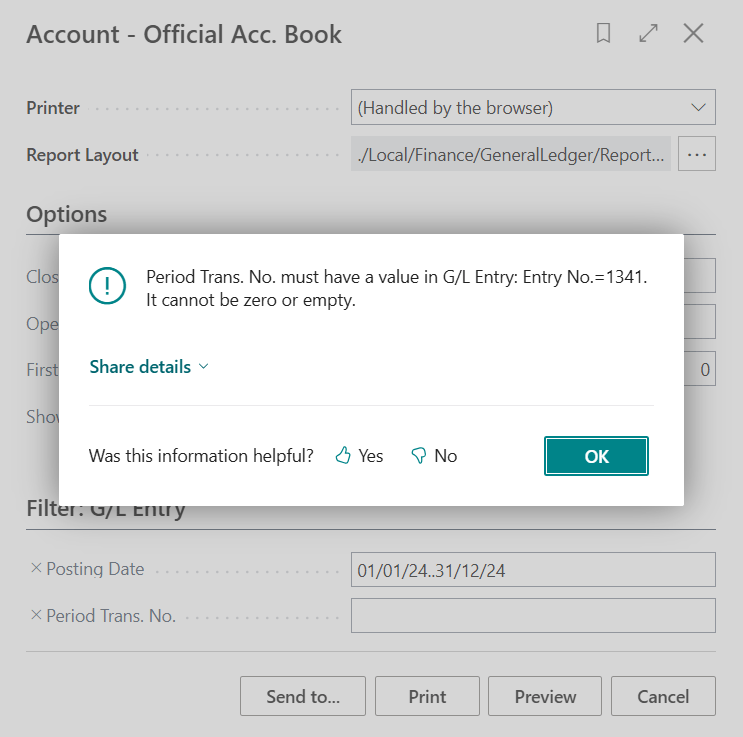
  • In the Spanish localisation of Dynamics 365 Business Central SaaS, organisations must comply with strict accounting regulations. One of the key requirements is the ability to generate official account book reports that can be submitted to auditors or tax authorities.

    Business Central provides two specific reports for this purpose:

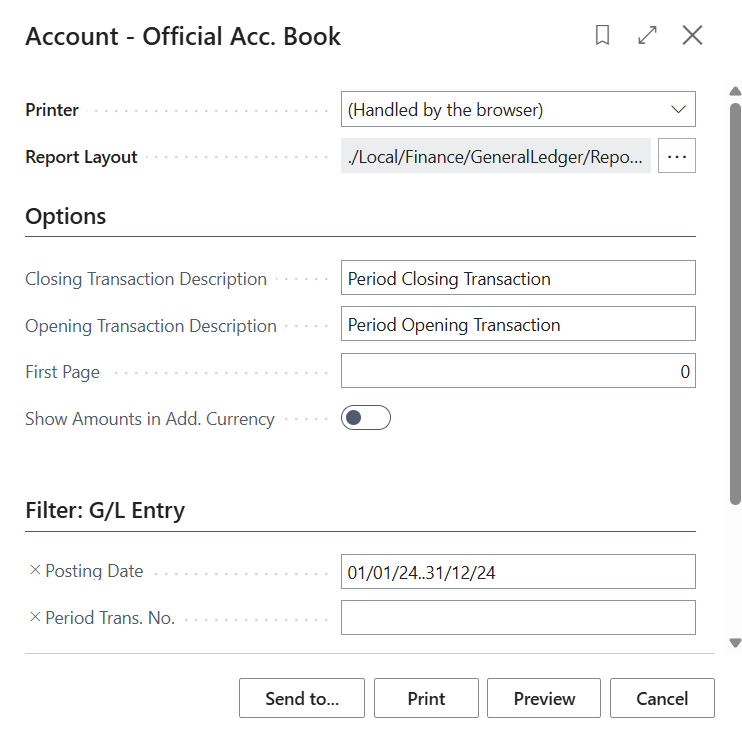
    • Official Account Book Report – shows all accounting entries grouped by transaction.
    • Summarised Official Account Book Report – provides a condensed view grouped by posting accounts or general ledger accounts

    Key Options When Printing

    When printing these reports, users can configure several important fields:

    • Closing Entry Text – description for the period’s closing transaction.
    • Opening Entry Text – description for the period’s opening transaction.
    • First Pagethis option allows you to define the starting page number of the report.
      • Example: if you include three introductory pages before the report, you can set the first page of the report to start at page 4.
      • This ensures consistent numbering across multiple print runs and avoids confusion when reports are reprinted or extended.
    • Show Amounts in Additional Currency – display values in a secondary reporting currency.
    • Filters – select the accounting period or posting ranges to include

    Why the “First Page” Option Matters

    The First Page field is particularly relevant in Spain, where official reports may need to be reprinted or extended with annexes. By renumbering the first page, organisations can:

    • Maintain continuity across multiple submissions.
    • Ensure auditors receive correctly sequenced documentation.
    • Avoid discrepancies when combining reports with supplementary information.

    This feature reflects Microsoft’s commitment to supporting local fiscal compliance while maintaining flexibility in SaaS environments.

    NOTE:
    To renumber the entry number for the period, go to «General Ledger Entries» and then to the option: Assign entry number for period.

    To conclude:

    The Spanish localisation of Business Central SaaS provides robust tools for fiscal compliance. The ability to renumber reports using the First Page option ensures clarity and consistency, especially when reports are printed multiple times or combined with additional documentation.

    For auditors, accountants, and ERP consultants, this functionality is a small but critical detail that guarantees compliance and transparency in financial reporting.

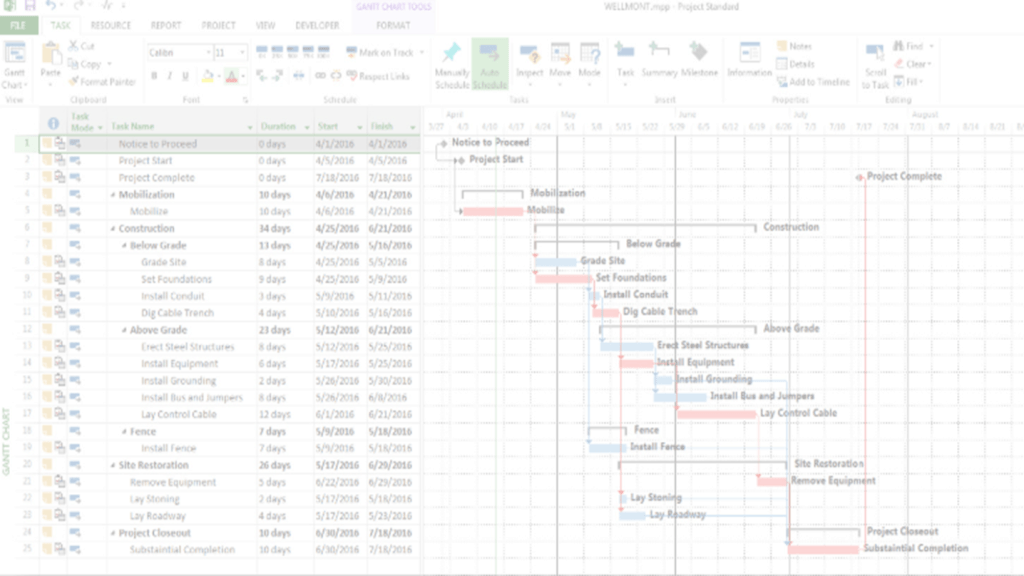
  • Managing Complex Projects: Beyond Timelines and Deliverables

    Project management has always been an exercise in balance: between people, processes, and technology. Yet when we speak of complex projects, that balance becomes a far greater challenge. A well-designed timeline or a neat list of deliverables is no longer enough; what truly makes the difference is the ability to integrate multiple dimensions simultaneously—distributed teams, diverse fiscal regulations, hybrid methodologies, and business expectations that evolve rapidly.

    My Experience Across Multiple Fiscal Localisations

    As an ERP consultant and Microsoft Dynamics specialist, I have had the opportunity to lead projects in Bolivia, Colombia, Chile, Ecuador, Guatemala, Honduras, Mexico, Nicaragua, Paraguay, Peru, Spain, Uruguay, and other countries with distinct fiscal frameworks. Each localisation adds a layer of complexity:

    • Specific tax regulations requiring tailored invoicing and reporting processes.
    • Multicultural teams working in parallel, each with its own operational rhythm.
    • Legacy systems that must be integrated with modern solutions such as Business Central SaaS.
    In these scenarios, managing complex projects is not only a technical exercise—it is also cultural and strategic. The key lies in designing a methodology that enables teams to align while meeting local compliance requirements without losing agility.

    Previous Scenario: Linear and Limited Management

    Traditionally, projects were managed with a linear approach: rigid timelines, sequential phases, and little flexibility to adapt to unexpected changes.
    In multinational projects, this often led to:

    • Delays caused by differing regulations across countries.
    • Additional costs from unforeseen fiscal adjustments.
    • Frustration among teams unable to progress until others had completed their tasks.

    Current Scenario: Strategic and Collaborative Leadership

    Today, managing complex projects rests on three pillars:

    – Hybrid Methodologies: Combining agile frameworks (Scrum, Kanban) with traditional practices (PMI, PRINCE2) allows adaptation to the realities of each team and each country.

    – Integrated Technology: Tools such as Dynamics 365 Business Central and Project Operations provide full traceability—from resource management to fiscal compliance across multiple localisations.

    – Proactive Risk Management: Risks are no longer seen merely as threats but as opportunities to anticipate issues and strengthen project resilience.

    Real-World Use Cases

    – Multinational ERP Implementation
    Coordinating teams across time zones while configuring fiscal localisations in parallel.
    Example: Spain and Peru, with VAT and withholding regulations requiring specific setups.

    – Digital Transformation in Retail
    Integrating inventory and invoicing systems across several countries, ensuring fiscal compliance and uninterrupted operations.

    – Infrastructure Projects with Multiple Contractors
    Managing dependencies and risks in environments where each provider faces distinct fiscal obligations.

    Recommendations for Leaders and Superusers

    • Review roles and permissions in the system to ensure traceability and compliance.
    • Use risk and dependency dashboards to anticipate problems before they affect timelines.
    • Document lessons learned at each stage to build a culture of continuous improvement.
    • Separate fiscal management by localisation within the ERP to avoid duplication and errors in consolidation.

    📍 Official reference:

    🔗 Microsoft Learn – Project management overview in Dynamics 365: Project management overview | Microsoft Learn

    To conclude:

    Managing complex projects is not simply about controlling tasks: it is an exercise in leadership, vision, and adaptability.

    When a project spans multiple countries, fiscal regulations, and distributed teams, project management becomes the true architect of trust.

    With hybrid methodologies and modern tools such as Business Central SaaS, we can transform complexity into sustainable results, ensuring that every team, every localisation, and every client moves forward in the same direction.

  • Durante años, los equipos de almacén que trabajaban con Microsoft Dynamics NAV y en Dynamics 365 Business Central se enfrentaban a una limitación silenciosa pero crítica: solo un usuario podía registrar movimientos de inventario en un momento dado. Esto no solo ralentizaba la operativa, sino que generaba cuellos de botella innecesarios en entornos con alta rotación de stock.

    Microsoft introdujo una mejora funcional que transforma esta dinámica: ahora múltiples usuarios pueden registrar inventario de forma simultánea, sin bloqueos ni conflictos.

    Escenarios anteriores: eficiencia limitada por diseño

    Imagina un almacén con tres operarios trabajando en zonas distintas. Uno registra una entrada de mercancía, otro ajusta un inventario por rotura, y el tercero realiza una transferencia interna. En versiones anteriores, si dos de ellos intentaban registrar al mismo tiempo, el sistema bloqueaba el proceso, mostrando mensajes como “El registro está en uso por otro usuario”.

    Esto generaba:

    • Tiempos muertos innecesarios
    • Frustración operativa
    • Riesgo de errores por registros acumulados

    Escenarios actuales: colaboración sin fricción

    Business Central permite que varios usuarios registren movimientos de inventario en paralelo, siempre que trabajen sobre líneas distintas o documentos independientes.

    Esto significa:

    • Flujo operativo más ágil
    • Reducción de esperas en almacenes activos
    • Mayor aprovechamiento del tiempo del equipo

    Casos de uso reales

    1. Recepción simultánea en múltiples muelles

    Cada operario registra entradas de mercancía en su zona sin esperar a que otro finalice.

    2. Ajustes por inventario físico en paralelo

    Durante conteos cíclicos, varios usuarios corrigen cantidades en distintos artículos al mismo tiempo.

    3. Transferencias internas entre ubicaciones

    Dos operarios registran movimientos entre ubicaciones sin bloquearse mutuamente.

    Recomendación para superusuarios y administradores funcionales

    1. Revisar permisos de usuario Asegúrate de que los roles operativos tienen acceso a los diarios de inventario y pueden registrar sin restricciones innecesarias.
    1. Separar diarios por zonas o turnos Evita que múltiples usuarios trabajen sobre las mismas líneas para reducir riesgos de duplicidad.
    1. Activar el registro de sesiones Para auditar quién registró qué y cuándo, activa el log de sesiones y cambios.

    Para terminar:

    Esto no es solo una mejora técnica: es una respuesta directa a una necesidad operativa real. Permitir el registro simultáneo de inventario transforma la forma en que los equipos trabajan, colaboran y responden a la demanda logística.

    ¿Tu almacén sigue esperando turno para registrar? Con Business Central, ya no tiene por qué.

    ¡Muchas gracias por leer mi contenido!

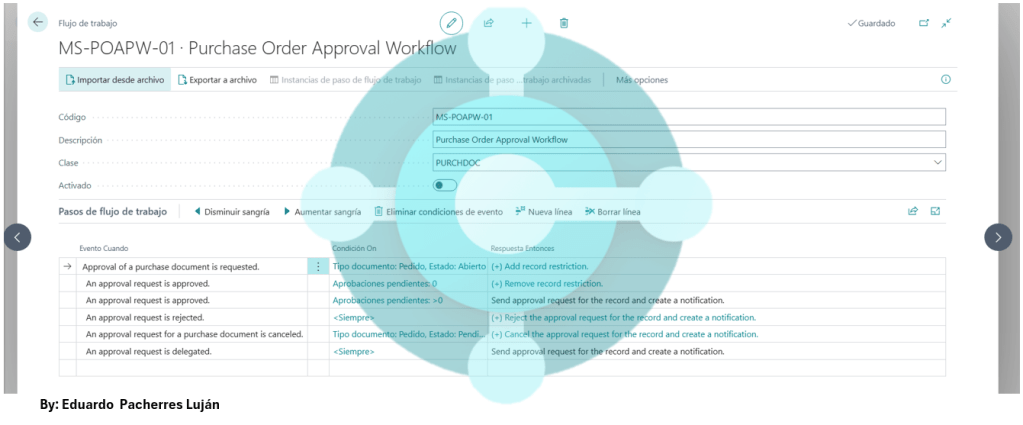
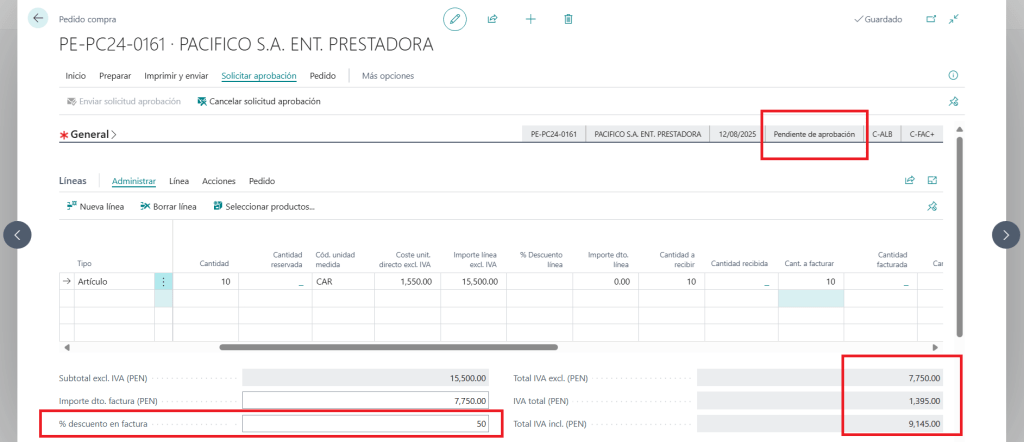
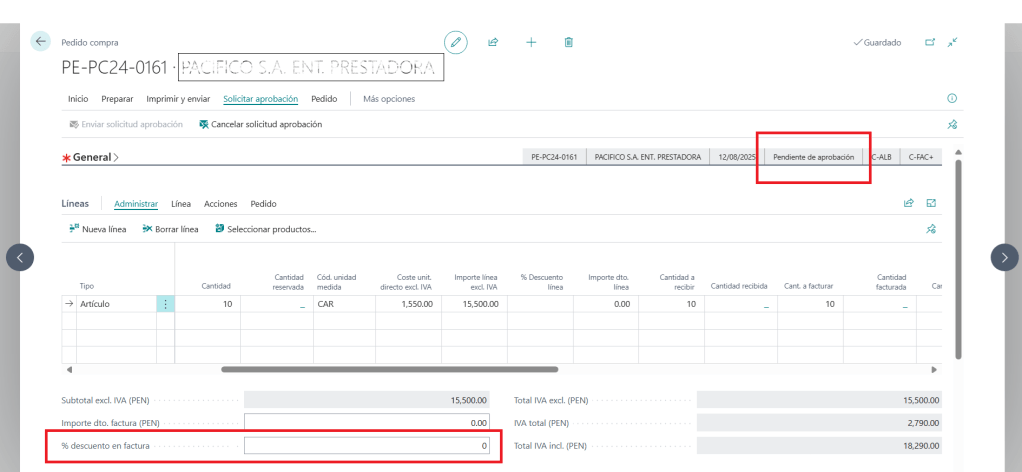
  • En Business Central, cuando se envía una solicitud de aprobación para una factura de compra o venta, el documento entra en estado “Pendiente de aprobación”. Sin embargo, existe una situación crítica: el campo de descuento puede seguir siendo modificado sin restricciones, incluso después de haber iniciado el flujo de aprobación.

    Esto representa una brecha funcional que puede afectar la integridad del proceso, especialmente en entornos donde el descuento tiene impacto contable, fiscal o contractual.

    ¿Qué implica esta situación?

    • Riesgo de manipulación posterior: El aprobador revisa un documento que podría haber sido alterado después de la solicitud.
    • Desalineación entre lo aprobado y lo registrado: El monto final puede no coincidir con lo que fue validado.
    • Falta de trazabilidad clara: No siempre queda registro de quién modificó el descuento ni cuándo.

    ¿Qué puedes hacer como consultor o administrador funcional?

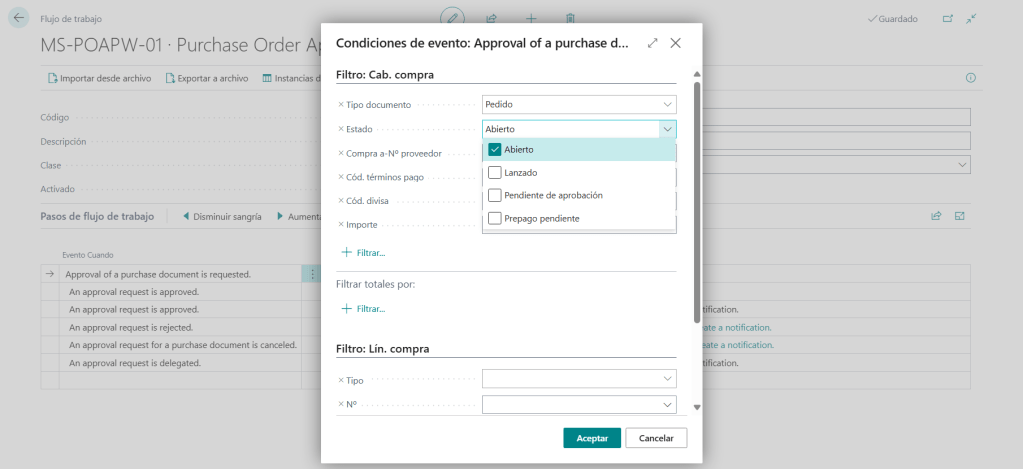
    1. Revisar el diseño del flujo de aprobación

    Asegúrate de que el flujo incluya condiciones que bloqueen la edición de campos sensibles una vez enviada la solicitud.

    2. Activar validaciones personalizadas

    Puedes usar Power Automate o eventos personalizados en AL para bloquear cambios en campos clave cuando el documento esté en estado de aprobación.

    Ejemplo: Power Automate → Trigger: On Field Change → Condition: Status = Pending Approval

    3. Auditar cambios en campos sensibles

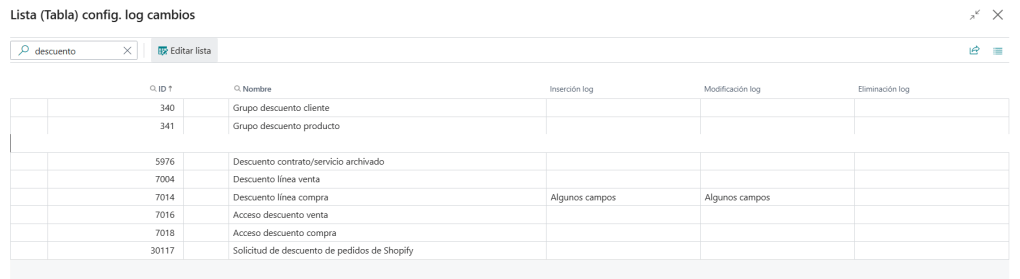
    Revisa el historial de cambios en el documento para detectar modificaciones posteriores a la solicitud.

    Recursos recomendados

    Para terminar:

    El hecho de que se pueda modificar el descuento en una factura pendiente de aprobación no es un error técnico, sino una decisión funcional que requiere revisión. Si tu organización depende de aprobaciones como mecanismo de control, este comportamiento puede debilitar la confianza en el proceso.

    ¿Tu flujo de aprobación protege lo que realmente importa?

    ¡Muchas gracias por leer mi contenido!

  • In ERP environments, leadership is often assessed through operational indicators: meeting deadlines, reducing errors, improving process efficiency. While these metrics are useful, they don’t always reflect what truly matters: the human, strategic and transformational quality of leadership.

    This post invites you to look beyond technical performance and explore KPIs that evaluate how you lead—not just what you deliver.

    Why Do We Need Different Indicators?

    An ERP system like Business Central can show whether an invoice was posted, inventory reconciled, or a workflow executed. But it can’t tell you whether your team trusts you, whether decisions are understood, or whether the culture you’re building is sustainable.

    As James Kouzes and Barry Posner (creators of the Leadership Practices Inventory) put it:

    “What leaders do determines whether people become engaged or disengaged.”

    KPIs That Actually Measure Leadership (Adaptable to ERP Contexts)

    1. Functional Trust Index

    Do your team members validate decisions without constant supervision? This KPI measures how many key users execute complex processes autonomously—because they understand the “why” behind the “how”.

    2. New Version Adoption Rate

    Does your team embrace ERP updates without resistance or delay? This indicator reveals whether change is perceived as evolution or threat.

    3. Operational Autonomy Level

    How many processes run without direct leadership intervention? Strong leadership doesn’t control—it enables. This KPI tracks how many key processes are executed without unnecessary escalation.

    4. Emotional Impact of Leadership

    How is your leadership perceived during times of crisis or change? This KPI isn’t found in the ERP, but in conversations, talent retention, and how errors are handled.

    Academic References Supporting This Perspective

    • Universidad Nacional Federico Villarreal (2023): Empirical review of transformational leadership in educational settings, using the Multifactor Leadership Questionnaire (MLQ) and Leadership Practices Inventory (LPI) as key instruments. www.scielo.org.pe
    • BSC Designer – University Scorecard Example: Strategic map applied to educational institutions, measuring not only academic performance but also participation, retention and organisational culture. Un Ejemplo de un Cuadro de Mando Universitario con KPIs

    In closing:

    Your leadership isn’t measured solely by what the ERP records. It’s measured by what your team feels, understands and sustains when you’re not watching. The KPIs that truly matter don’t live in the balance sheet—they live in the culture you build every day.

    What KPI reflects your leadership today? And which one would you like to start measuring?

    Thanks so much for reading my content!

EPL – Consultoría y Dirección – ERP MD365BC

Transformando procesos con visión funcional, formación y liderazgo estratégico

Saltar al contenido ↓